This forum is preserved as a permanent archive. The community continues at eMedia Press.

Announcement

Collapse
No announcement yet.

My Motors got me to Tap into Radiant Energy

Collapse
X
 
  • Filter
  • Time
  • Show
Clear All
new posts

  • Cornboy 555
    replied
    Supply.

    Thanks for your results Hitby, , was your motor powered by batteries, or from Grid supply?

    Regards Cornboy.

    Leave a comment:


  • prochiro
    replied
    Hitby
    Do this

    void loop() {
    //have the arduino wait until it receives a message
    if (Serial.available() > 0){
    // Read serial input
    while(Serial.available() > 0){
    msg += char(Serial.read());
    delay(250);// change this 250 to 15 , will stop fluctuations .

    Dana

    Leave a comment:


  • Hitby13kw
    replied
    @Dana, Thanks for posting your test results with Garry's new code, it inspired me to give it a go . . . .

    @Garry, Made the code changes you already discussed with Dana, and one additional line
    arrPWMPins[1] = 5; // Original Value was 10 ~ changed to 5 so would not have to remake interface cable hardware

    I felt we were good to go, so after obtaining the Klein CL2000 True RMS meter UFO recommended (Thanks for the Tip Bro)


    Quadblink

    Volts Amps RPM

    30 - 6.74 - 1394
    40 - 7.05 - 1914
    50 - 8.90 - 2319
    60 - 11.60 - 2753
    70 - 14.65 - 3165
    80 - 18.66 - 3633
    90 - 23.58 - 4040

    RadiantMotorControlVersion0.0.1

    30 - 5.38 - 1250
    40 - 5.88 - 1749
    50 - 8.29 - 2050
    60 - 10.73 - 2300
    70 - 11.24 - 2840
    80 - 13.90 - 3120
    90 - 16.60 - 3440

    Hitby13kw

    Leave a comment:


  • GChilders
    replied
    @Dana
    first,
    comment out the rpm check if you have not got a hall effect sensor, or infrared send receive module for tracking rpms connected to your interrupt0 pin.

    this could stall out the program as it looks for information that should have a value and defaults to zeros as there will be no information updated to the rpm array without the action of the update.

    do you have a handheld infrared tachometer? if so take the rpm readings if you would to let me know what rpm your motor is reaching I am blind without this information. So you changed the 65 to 70 then to 75 and then to 80 and it still oscillates?

    and when you say it oscillates I take that to mean it goes up in rpm and then down in rpm up in rpm and down in rpm??

    and mode 4 does not do this??

    so it would not be because of the pulsing

    were you able to get the motor to start at a faster speed and what setting did you end up with for the first argument, instead of 0 what did you put in.

    awaiting your answer,

    cheers

    Garry

    Leave a comment:


  • prochiro
    replied
    @Garry
    Yes (15) is good for the first question and it will work just fine with 10 also.
    I was testing with 2 brush setup and as usual starting with 12 volts. While in M5 mode, nothing seemed to help although this revving did not occur in any other mode. Now I did not un-comment the large speed control section. I went to 24 volts and the revving stopped but then the ramp up was gone. Maybe all this could be explained by the lack of RPM sensor installed? Anyway I'll keep checking out other parts of program. Did you find a way to convert the strings you were talking about.
    Good Work
    Dana

    Leave a comment:


  • JohnStone
    replied
    Originally posted by Cornboy 555 View Post
    John Stone, Garry Childers, and Dana, You Guys ROCK,

    Thank You soooo Much.

    Warm Regards Cornboy.
    Thanks for appreciation!
    We live in an amazing time.
    When I startet my career first microprocessors arose (6505 from Rockwell). A sample board was about 1K bucks. An ethernet I/F was a 19" x 19" PCB built with basic logic ICs. Semiconductors were built from structures between gigantic 3...5 micron. (now "wires" in chips are paved from 50 atoms in width)
    At that former times it occured sometimes that insects lived on those warm boards - therefore the term "buck" for a malfunction.
    Later we run nurse call systems for whole hospitals from a single micro like 1/3 Arduino performance.

    And now anybody can buy a processor as system for some bucks, we have plenty of choices and the problem is more to choose the right ones.
    I'd like to get you all aware of these facts in order to express the real needs first. Electronic and programing is not our goal but our tool. Therefore we need to choose the right components in order to focus an motor performance.

    Cornboy, obviously you never were touched by tinkering with electronics. That is completely OK. Guys like you need a tool to run MAG3. OK - you are our reference customer and the tools we discuss here shall be your tools.
    JS
    Last edited by JohnStone; 07-25-2013, 10:26 AM.

    Leave a comment:


  • Cornboy 555
    replied
    Rockers.

    John Stone, Garry Childers, and Dana, You Guys ROCK,

    Thank You soooo Much.

    Warm Regards Cornboy.

    Leave a comment:


  • JohnStone
    replied
    @Garry,
    thanks for your contribution. It is amazing how you master codes. You arrived this forum just in the correct moment in order to give it a new kick - just in time
    I can not access dropbox from my working place but I am sure your tut is is professional as well.

    I2C:
    Because of the existance of the clock and Arduino being the master there is no complicated timing to obey. Standard clock speed is up to 100Khz and will go for some slaves beyond 400Khz. Only the slowest slave is the restiriction. And the master does not need to clock on a regular basis.
    As I2c has no inherent data check we need to take some provisions (1) Cables shall be shielded and low capacitance (CAT5 pach cables -> cheap and superiour) (2) SW shall check for values out of range.
    Opto isolation is possible if requested.

    BT:
    As our setup spreads a lot of radio disturbance and GND currents it will be critical for PCs. Some of us will not dare to connect their sole PC. As far as I know, those cheap BT modules can be run as COM I/F like USB. I feel tehre is not more to it than writgn some few code lines. Do you agree?


    Dashboard:
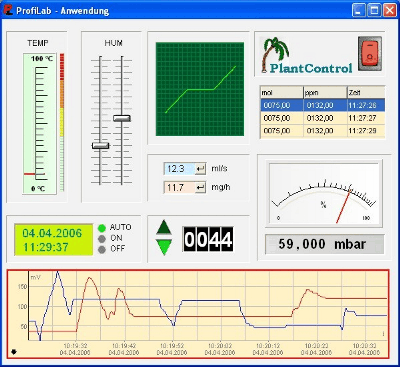
    Yes I agree an LCD is very restricted. It is a great help if you priovide a dashboard on PC level. But we do not want to load you with excessive tasks. May I point you to the SW tool Profilab Expert.

    The serial protocol is programable and will talk to Arduino.
    Additionally lots of measurement tools can be added directly to PC.

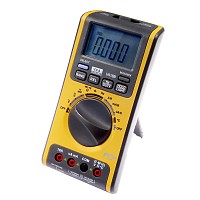
    I own some VA18B with opto isloated USB/serial link.
    It is not remote controllable but transmits 3 times a second its values (those adjusted by the local dial)
    The message is: Our Arduino is not supposed to perform ALL taks.

    I own Profilab expert and am willing to contribute taylored run time versions as dashboard to Arduno. Hence my suggestion is: you decide how much dashboard you want to provide and what complecity. Dedicated dashboards for certain test shall be done by Profilab.

    Once again: I want you all to know where our playground can be - we chose the limits.
    JS
    Last edited by JohnStone; 07-25-2013, 02:22 PM.

    Leave a comment:


  • CalebMcanelly
    replied
    A teacher, or the prison, more and more ares are considering the legal use of cell phone jammers, it has been a necessity of our daily life, I have got one for my family. so if you want to get one, you can go and visit it for more details. share with you!

    Leave a comment:


  • prochiro
    replied
    Hello Garry
    The first question is solved. I changed it to 25 and there was still a small burp in motor speed so changed it to 15 and it is seamless operation.
    Too late for the rest and I will put a scope of it in the morning to see what is going on there.
    Dana

    Leave a comment:


  • prochiro
    replied
    Hello Garry
    The first two now I can handle after seeing your examples. Let me change those and see after that what happens first.
    Thanks
    Dana

    Leave a comment:


  • GChilders
    replied
    motor stopping with new program

    @Dana

    Yes and I think I know what the problem is for all three conditions that you are speaking of. 1. The motor starts out slow. This is a simple fix. I thought that we could ramp up the speed in 200 rpm increments this may be unnecessary. Let me show you how to solve all three problems. The motor stopping when you change modes is most probably because of a 250 millisecond delay in the serial transmission. I read that this delay is necessary but I don't think it needs to be nearly this long. here is where you will find it in the main loop
    void loop() {
    //have the arduino wait until it receives a message
    if (Serial.available() > 0){
    // Read serial input
    while(Serial.available() > 0){
    msg += char(Serial.read());
    delay(250); change this to 25 milliseconds and see if the problem is solved. The problem may manifest it self in the serial monitor echo being broken instead of echoing the command. in other words motor started will break up into different lines.

    a little further down there is this line in the serial commands

    else if (msg == "Start"){
    boolianMotorSpeedRamp = 1;
    motorSpeedRamp(0, 65);
    Serial.println("Motor Started");
    }

    try changing the number 0 to 1 if it still starts too slowly go to 2 and so on until you get a start that seems natural and easy. Then post about the change.

    the motor oscillating has me wondering. Is it moving past 3600 rpm? and then coming back down to 3600 rpm or is it struggling to get to 3600 rpm and then moving back down? The second number that you see above is the
    duty cycle and actually may be either too high or too low. The number needs to be lowered if it is overshooting the mark and coming back down, it needs to be raised if it is struggling to get to 3600 and then moves down. Let me know.

    Cheers

    Garry

    Leave a comment:


  • Ufopolitics
    replied
    Channel1 and 4?

    Originally posted by prochiro View Post
    @ Garry
    Got it up and running on my two brush. Running on M5, she starts slow and comes up to max and motor speed oscillates up and down. Where do I go from there?
    Also motor stops whenever any input is entered and then returns to previous speed. I sent you a PM earlier today and it sounds what I stated is possibly the case here.
    Besides motor speed being controlled by Battery volts, is there any method I missed to control speed here.
    Overall my impression of your program is pure talent. Some issues will always arise and I know you will handle them in due time. We are blessed to now have you on the active team.
    Dana
    Hey Dana,

    Could it be possible that you have Two Channels out of Sequence, or too spaced apart...say 1 and 4...that's related to your Two Brush Motor Speed Oscillating...just thinking of a "probable cause" within the hook up...

    A Two Brush Set Up...getting a too wide space between firing times...will definitively oscillate.

    Maybe not a possibility to make that mistake there...don't know...You two Guys are the Ones running "The Show" here.

    And yes, it is a blessing to have Gerry here...I believe this Configuration will render Good Results.

    Warm Regards


    Ufopolitics
    Last edited by Ufopolitics; 07-25-2013, 03:05 AM.

    Leave a comment:


  • prochiro
    replied
    @ Garry
    Got it up and running on my two brush. Running on M5, she starts slow and comes up to max and motor speed oscillates up and down. Where do I go from there?
    Also motor stops whenever any input is entered and then returns to previous speed. I sent you a PM earlier today and it sounds what I stated is possibly the case here.
    Besides motor speed being controlled by Battery volts, is there any method I missed to control speed here.
    Overall my impression of your program is pure talent. Some issues will always arise and I know you will handle them in due time. We are blessed to now have you on the active team.
    Dana

    Leave a comment:


  • sampojo
    replied
    Garry love your work

    Truly exciting foray into motor control. Some C++ experience so I am just salivating about loading it in an Arduino hooked to my laptop. Between you and John Stone, the sky is the limit. Fear not on being a sole software developer. Lots of capable people following can contribute needs and hopefully get the team synergism going. Hand the ball off and let someone step up for the next mod.

    Got JS boards in last week from OSHPark, MOSFETs today. @UFO thanks a lot for the kibosh on my Chinee purchase! . Well my testbed motor is a small QP10, not that monster Imperial. (On my radar) Active components from Mouser, cheaper than ebay, bulk passive components at ebay.

    Jim Neal from OSHPark just sent me this:

    Hi Joe!

    I'm working on a new way to do project sharing that's going to replace the store. It should be ready in a week or two.

    -Laen

    Online availability of Monster Driver PCB boards coming...

    Gotta pick my poison on the Arduino now.

    EDIT: took the plunge, arduino uno and prototype board, wow set me back $18. lol
    Last edited by sampojo; 07-25-2013, 04:20 AM.

    Leave a comment:

Working...
X